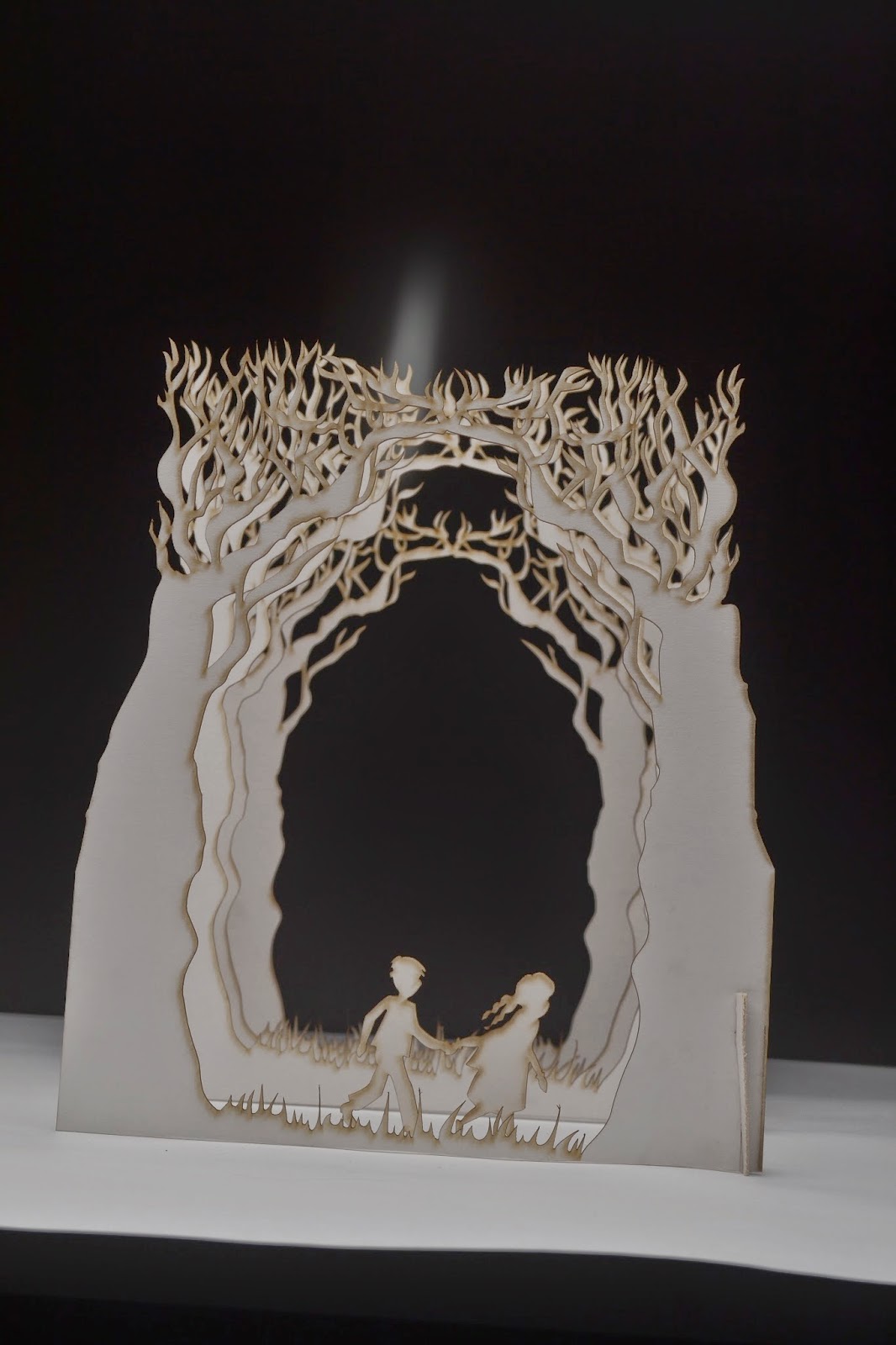
I did the same to the author name but added it to the top of the image to balance it out. I think this cover turned out well after some editing on photoshop. It looks how I originally intended so I am pleased with it.
Showing posts with label photography. Show all posts
Monday, 12 January 2015
Editing the Carrie's War photograph in photoshop: Front cover
I started off with the original image that i took in a studio with studio lighting.
I then straightened the image up and changed the levels to make the lighting and shades look how I wanted them to, This involved mainly darkening up the image a bit and lightening the back of the image more. I then changed the hue/saturation to make it have more of an orangey/yellow glow like the back page does. I think changing the levels helped me to achieve the look that I wanted.
I then added in the title of the book I decided to have it at the bottom of the design because I thought that this made the perspective look good, the text actually looks like its in front of the scene. I then added a little bit of colour like the image but I wanted it to be slightly lighter so it showed up well against the background.
Photographing my Carrie's War cover: Front page
The front cover photo was harder to get right compared to the front cover as it was hard to light the image correctly as the house couldn't be too dark as the detail would be lost. This took a lot of trial and error, here are the photos that we started with. (they are slightly wonky but the final image wont be)
This was the first photo that we took, the lighting was completely off and there was all sorts of shadows being cast on the house so the lights had to be re positioned to eliminate this issue. Another problem with this image is the tree positions, they are too far away from each other so there is huge visible gaps between them.
This was getting closer but was still slightly too dark and a lot of the house detail was being lost. Also the top of the image was blurred and out of focus.
This was the first photo that we took, the lighting was completely off and there was all sorts of shadows being cast on the house so the lights had to be re positioned to eliminate this issue. Another problem with this image is the tree positions, they are too far away from each other so there is huge visible gaps between them.
The previously issue was now resolved and I tried photographing the scene with the title in the photo. I didn't like how this looked because it was hard to see the title. I took the title off and decided that I would add it later in photoshop.
This was getting closer but was still slightly too dark and a lot of the house detail was being lost. Also the top of the image was blurred and out of focus.
This is the image that I decided to work with in the end because the detail in the house was nicely visible. The front trees are not as dark as I would have liked them to be but I couldn't get the trees dark and the house light because they were quite close together. I think once this image is edited in photoshop it will work out how I want it to.
Labels:
Carries war,
commercial,
level 5,
lighting,
penguin,
photography,
puffin
Friday, 9 January 2015
Editing the Carrie's War photograph in photoshop: back cover
After taking my photos for the book cover, I decided to play around with the levels and the hue/ saturation to try and get it looking how I would like. I wanted the definition between the layers to be more clear and I also wanted to warm the image up a bit to make it look like it had more of an orange glow, rather than a bright one, I also straightened it up. Im really pleased with how this has turned out but the real challenge for me now is to work out how i'm going to insert the blurb and barcode into the image so it still looks good. Here are the images before and after they have been edited.
Photographing my Carrie's war cover: back page
I started to photograph (with a lot of technical help) my book cover design for carrie's war as this is a vital part of my design. It was very tricky as the lighting has to be perfect to give the effect that I want for the cover. As I have layers of trees making the scene look like a forrest the lighting had to be played around a lot to make the image have lots of depth and shadows. I decided to start by photographing the image that will be on the back of the cover because it more simple than the front cover image and thought it might be good to start off with a more simple image. Here are a few of the photos that I started with (They're a bit wonky)
We started off lighting it from above and the left side but it made the image look too flat and everything was all the same orangey colour so we tried a few different lighting and camera settings.
This time the image still looked too flat but the colour had improved as it was more white rather than orange. I want the original image to look white so it will be easier if I want to change the colours in photoshop when I edit them.
This image was getting closer yet again but was not quite there because there was more variation and depth between the laters with the way that the shadows fell but it wasn't quite right.
We decided to try it with the light closer to the image and try holding up tracing paper behind the set to soften the light this was creating even more depth but it still wasn't there
we then decided to try with lighting the set with the soft box from behind and this seemed to be the correct solution because it started to look a lot better. There was also a dimly lit light in front of the set to light the front of the image slightly. Now it was just a case of getting the composition and camera angle right. Here are the photos with the correct lighting.
This is the first image where the depth was really working and the shadows were looking good but the camera angle needed to be moved around to make the image central.
The camera angle on this image is improved from the last one but not completely right yet so we got a bit closer and straightened up the edges more.
Finally after a long morning of experimentation and lots of different lights and techniques being used we got the image just right. The next step is to edit the levels and colours a bit in photoshop to help the image reach its full potential.
We started off lighting it from above and the left side but it made the image look too flat and everything was all the same orangey colour so we tried a few different lighting and camera settings.
This time the image still looked too flat but the colour had improved as it was more white rather than orange. I want the original image to look white so it will be easier if I want to change the colours in photoshop when I edit them.
This image was getting closer yet again but was not quite there because there was more variation and depth between the laters with the way that the shadows fell but it wasn't quite right.
We decided to try it with the light closer to the image and try holding up tracing paper behind the set to soften the light this was creating even more depth but it still wasn't there
we then decided to try with lighting the set with the soft box from behind and this seemed to be the correct solution because it started to look a lot better. There was also a dimly lit light in front of the set to light the front of the image slightly. Now it was just a case of getting the composition and camera angle right. Here are the photos with the correct lighting.
This is the first image where the depth was really working and the shadows were looking good but the camera angle needed to be moved around to make the image central.
The camera angle on this image is improved from the last one but not completely right yet so we got a bit closer and straightened up the edges more.
Finally after a long morning of experimentation and lots of different lights and techniques being used we got the image just right. The next step is to edit the levels and colours a bit in photoshop to help the image reach its full potential.
Tuesday, 6 May 2014
Final unique horn photographs
Here are the final (un edited) Photographs for my narrative illustration. Next i will arrange these photos how i want them to be in the book and add things such as speech bubbles and other things that need adding in. I have also made a few images that aren't 3D they are just drawn and scanned in these are also going into the story but i will just add them in to the final stage of arranging the book.
Labels:
3d,
illustration,
narrative,
photography,
pony,
unicorn
Wednesday, 9 April 2014
Artist research: Slinkachu
As i am photographing my illustrations i decided to look at the photo artist slinkachu (thank you too whoever left the suggestion on my desk.) Slinkachu creates images using tiny figurines of people photographed in different scenario's. The greatest thing about his images is that he incorporates real life surroundings/things found in the street and uses them as the scenery/backgrounds of his images. Its great because close up the image looks like the background is a built set but when you see images that have been taken from further away you can see how tiny the figures are and its incredible.
I hope to do a similar thing with my drawings so looking at his work has really inspired me and helped me out with how i will photograph my work. Here are a few of my favourites.
![]() |
| The tiny people from the image above this one are here ^ |
Subscribe to:
Posts (Atom)